
What Swarm does

Everything it does, in one page.

Everything below is included at every size. No feature tiers, no upsells. These are the same screens the company that built Swarm runs its own commissions on.

Part one · Pay

The money engine.

Describe your pay plan once. After that, every check is math, not memory.

Payday is a review, not a project.

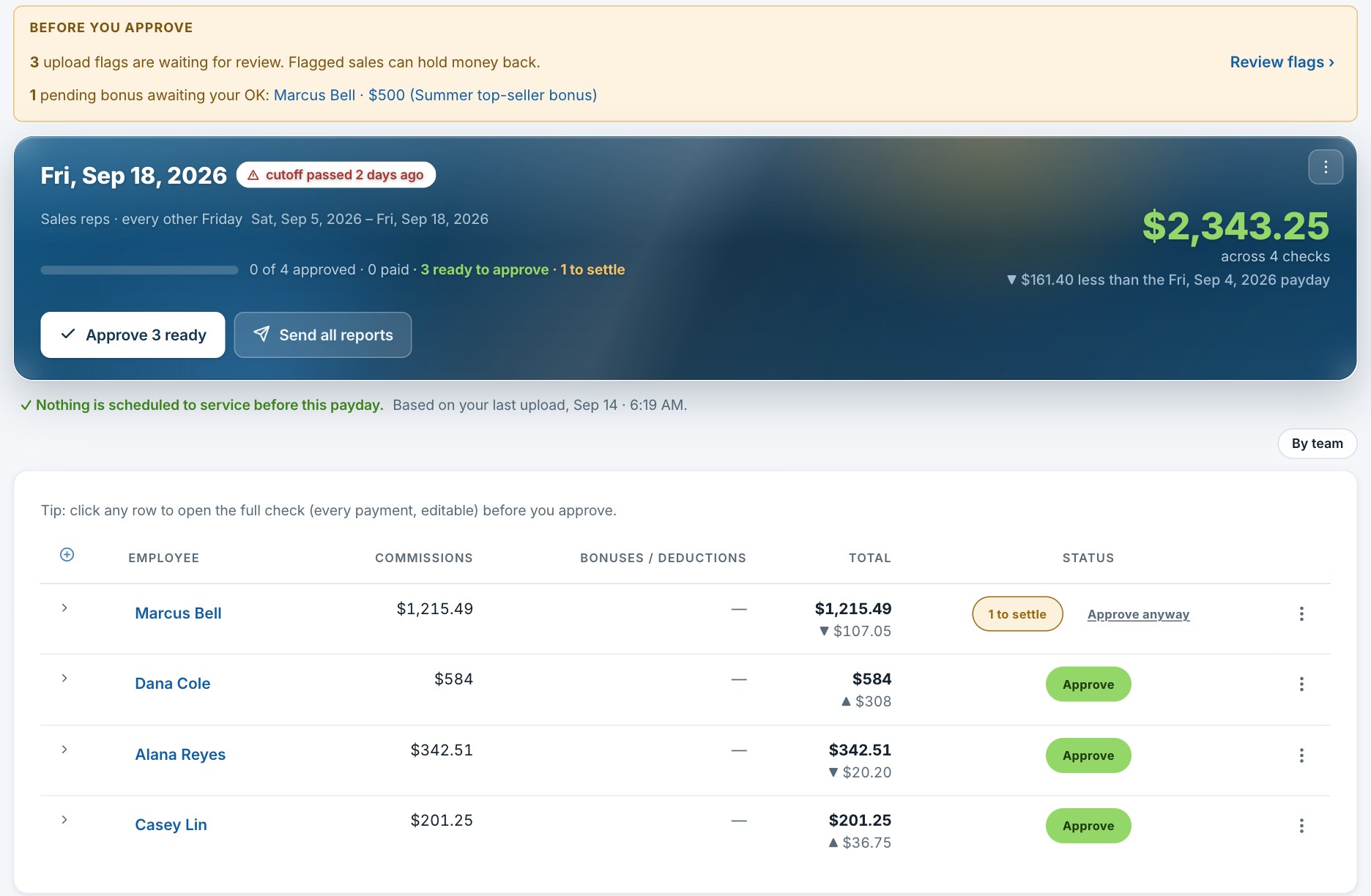
Open the payday and Swarm shows what changed since you last looked and the few things that need you. Approve one check or all of them, and every rep gets their own PDF.
Approve all What changed since your last look Hold and release A PDF for every rep
A payday open in Swarm: what to check before approving, the payday card with Approve 3 ready and Send all reports, and the four checks with an Approve button on each.

Describe your pay plan once. Any pay plan.

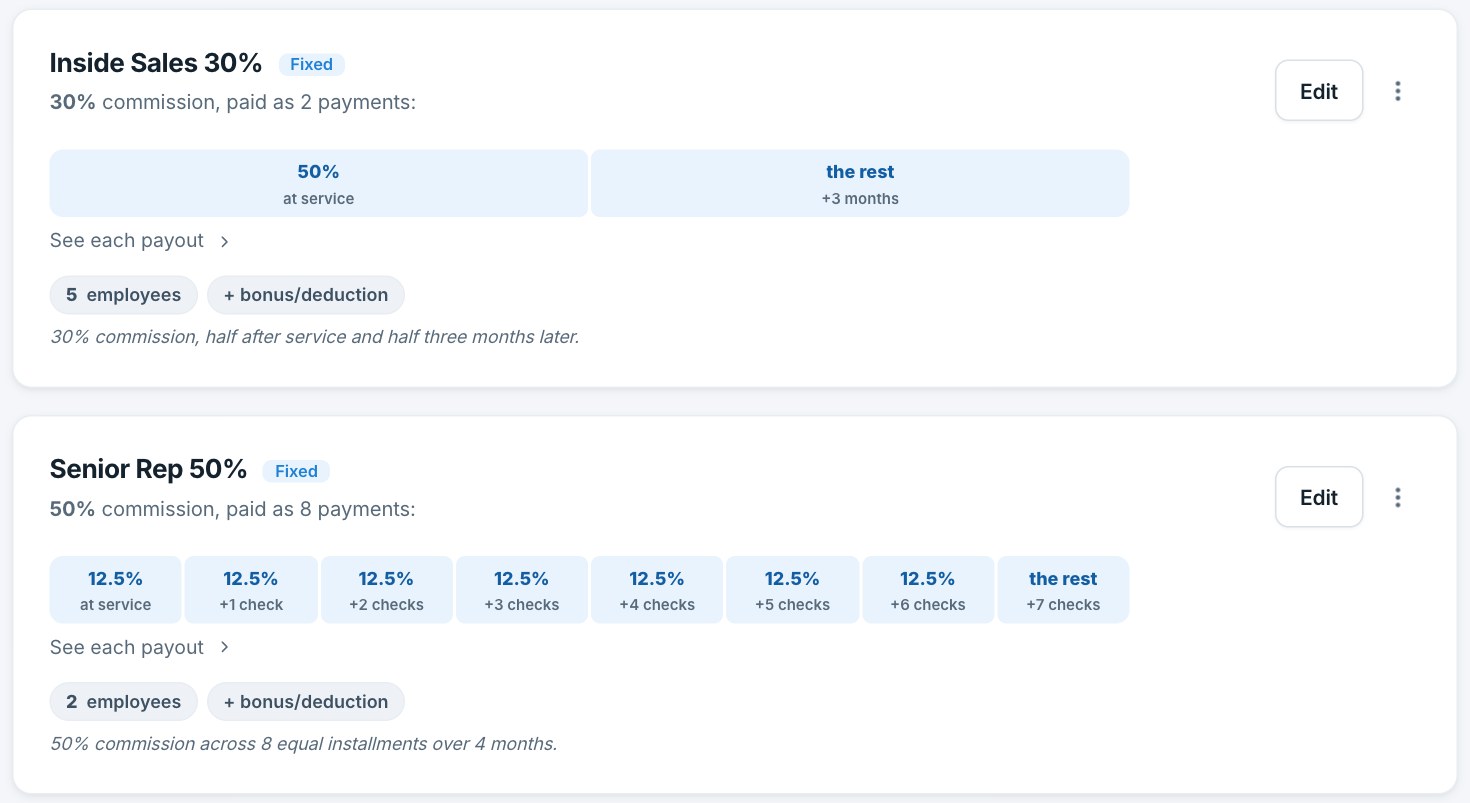
Installments over months, a piece up front and the rest later, tiered season rates, a technician's flat rate. Each plan draws itself as its payments, so you see what you built before anyone is paid on it.
Installments Tiered season rates Splits between reps Bonuses and deductions Packages
Two pay plans in Swarm, each drawn as its payments: Inside Sales 30%, half at service and half three months later; Senior Rep 50%, eight equal installments over four months.

Summer blitz math, settled like a contract.

Give a season its dates. Accounts that hold through the window are guaranteed, the season's rate settles once at the close, and every check after that agrees with it.

Qualification window Tiers settle at close Retention chargebacks
How a season settles
May 1Season opensSep 30Window closesDec 1Settles
184 accounts still active on Sep 30
Guaranteed. A later cancellation cannot claw them back.
Guaranteed

Override pay that adds up, in plain words.

Leaders and recruiters earn on the sales of the people under them. Swarm works it out per sale, by the rules you set, and every dollar of it is on the record.

Leadership plans Recruiting program A person's own deal
One sale, three people paid from it
The rep
Their commission, on their pay plan
Commission
Their team leader
The leadership plan's share
Override
Whoever recruited them
The recruiting program's share
Override
Part two · Sales and data

Nothing here needs babysitting.

Bring the CRM you already have. Swarm reads it, checks it, and guards every fix you make by hand.

Your CRM feeds it. It cannot break it.

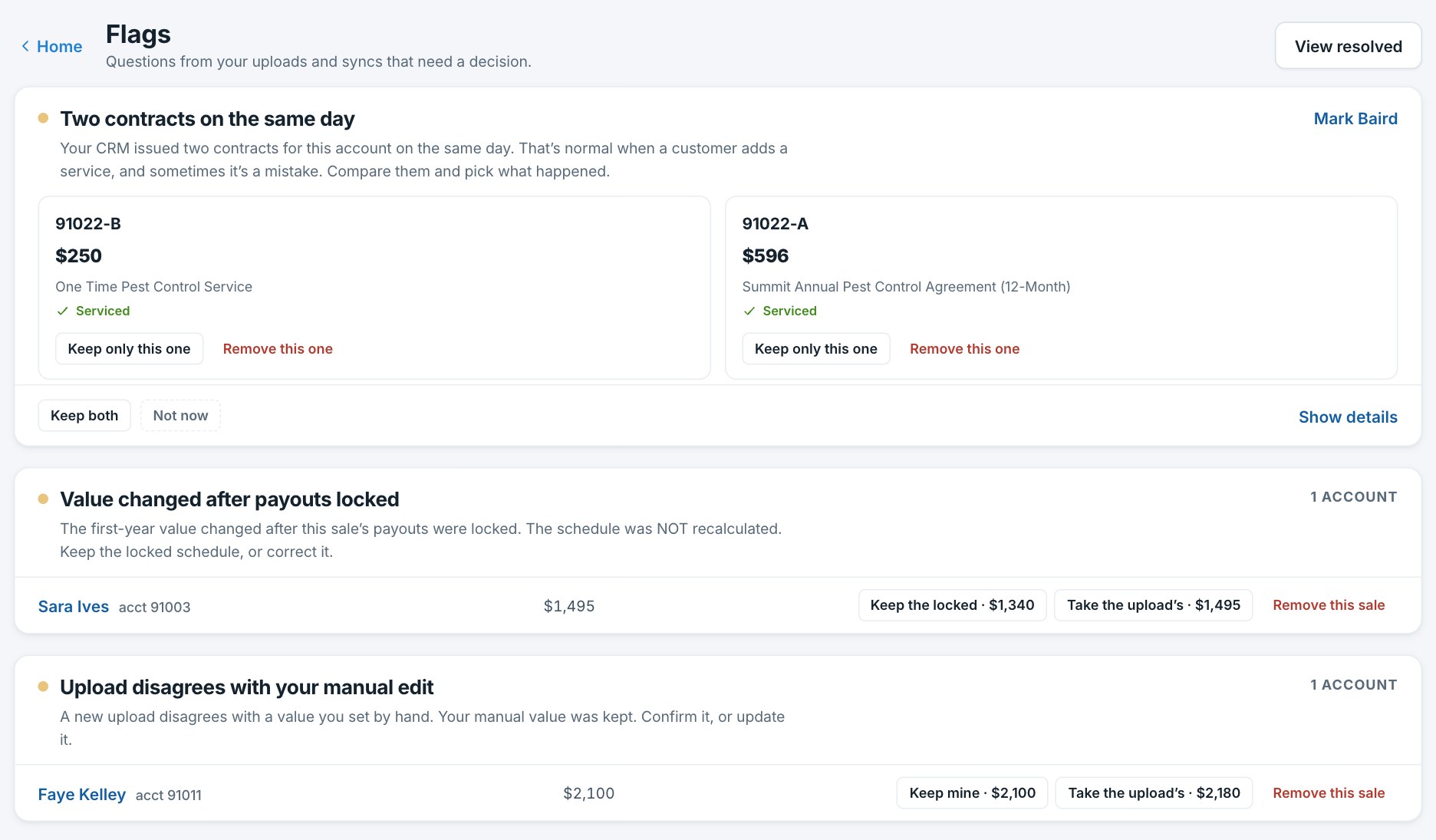
Upload the export you already pull, or connect a supported CRM and let it sync. Your splits, edits and notes are never overwritten, and anything Swarm is unsure about becomes a question with its answers attached.
Verified CRM sync Manual edits protected Duplicate detection Flags that clear themselves
Flags in Swarm: two contracts on the same day with the two contracts side by side; a value changed after the payouts were locked, with keep the locked value or take the upload's; an upload that disagrees with a manual edit, with keep mine or take the upload's.

Offices, teams and regions under one roof.

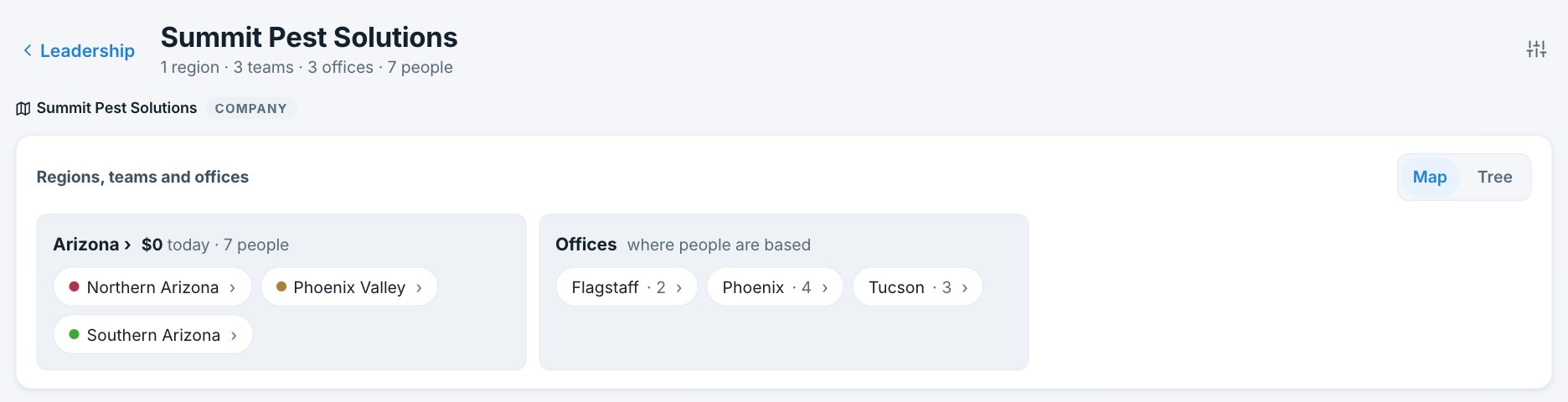
Each office keeps its own book under one login; teams and regions sit on top, so a leader sees their own people. A rep who sells in two offices still gets one clean check.
One login, every office Teams and regions Leaders see their own people
Organizations in Swarm: a company with one region holding three teams, and three offices, Flagstaff, Phoenix and Tucson, with the people based at each.
Part three · Leadership

The leader's home.

Recruit, sign, get them to day one, grow them, and see what the team earns you, from one page.

See, act, go.

A leader opens Swarm and sees today's numbers at their stand, then who needs them: who to call, who to move, what to schedule. Then the team's apps.
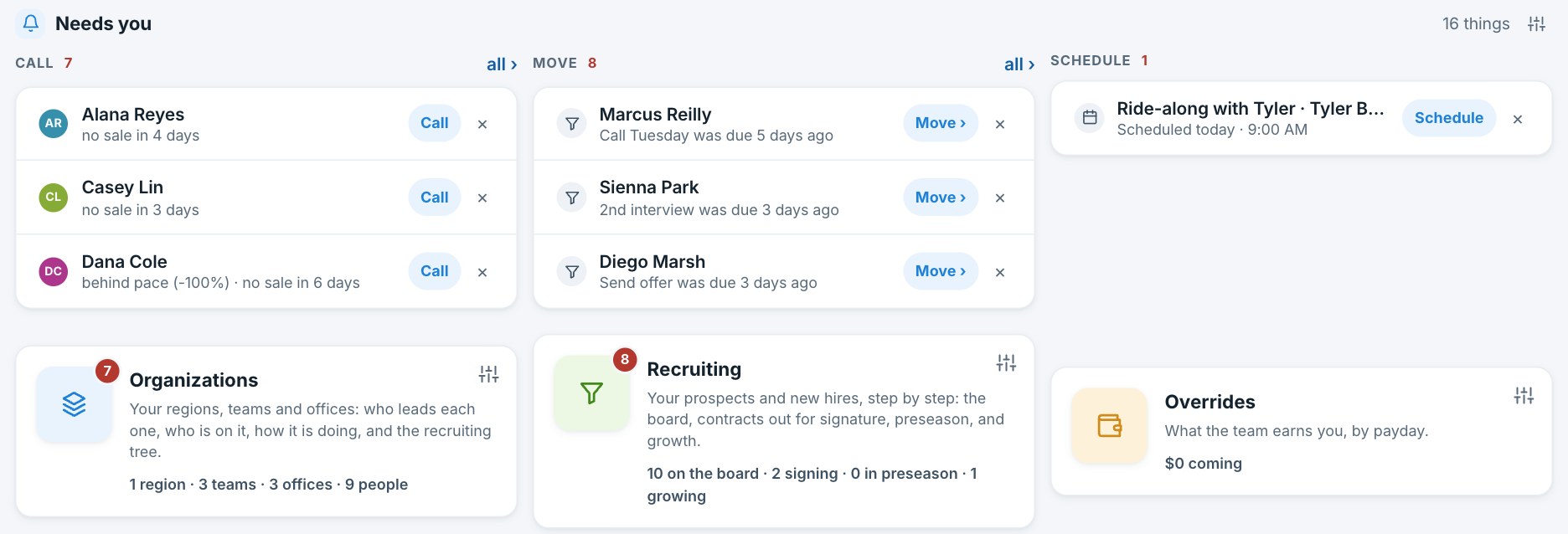
Today, at your stand Call · Move · Schedule Leaderboard What the team earns you
The leader's home in Swarm: Needs you in three lanes, Call, Move and Schedule, each with the people who need that, and the Organizations, Recruiting and Overrides apps under it.

Recruiting, in four steps.

A prospect answers your questions from a link you share, picks a time, and lands on your board. From there it is stage by stage to the signature, with a nudge when someone sits too long.
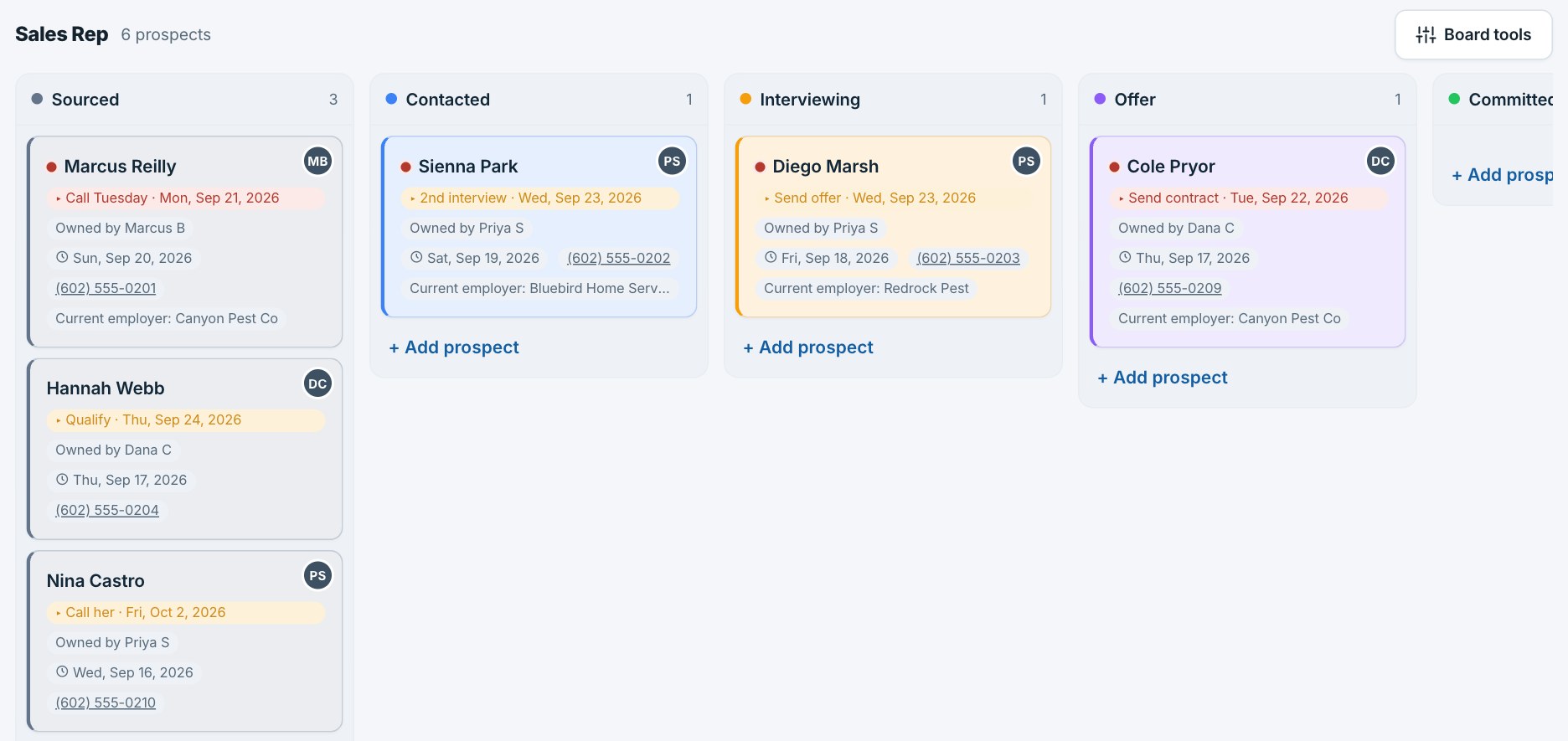
Your booking link Stages you define A nudge when someone stalls Meetings on the calendar
The recruiting board in Swarm: Sourced, Contacted, Interviewing, Offer and Committed columns, each prospect a card with their next step, its date, who owns them, and their phone.

Agreements signed for real, with the pay terms in them.

Send a link. The new hire reads the agreement on their phone, with their own pay terms written into it, and signs. The signed copy lands on their record, and their package sets them up the moment they are in.

Your own agreement Pay terms in the PDF Signed on a phone Set up from a package
Jess V. · Rookie 2026 package
Sent
A link, opened on her phone
Tue
Signed
Her tiers and pay plan in the PDF she signed
Wed
Set up
Pay plan, schedule, bonuses, portal: from the package
Same day
Preseason
Counting down to May 18
41 days

Preseason: from signed to day one.

Every new hire counts down to day one with their homework, the playbook and where they are staying. They see it on their phone; you see who is behind.

Countdown to day one Homework and the playbook Who is behind
Preseason · 41 days to launch
Watch the pitch
Done Apr 2
Done
Product knowledge quiz
Done Apr 4
Done
Record your first ten seconds at the door
Due Apr 12
Open
Housing
House 4, Flagstaff · keys on May 17
Set

Growth: the meetings after the signature.

The meetings a new hire gets after they sign, scheduled the moment they do, with the notes on their record and the invites on Google Calendar.

Scheduled from the signature Notes on the record Google Calendar and Meet
Growth track · Tyler B.
Vision meeting · 60 min
Within 5 days of signing · notes on the record
Done
Ride-along with Marcus
Fri, Sep 18 · 9:00 AM · 240 min
Scheduled
First-week check-in
Was due Tuesday
Late

The day board, in every pocket.

Today's production, by person, team and office, in every rep's pocket. It is the number everyone talks about at the end of the day, and it agrees with the checks.
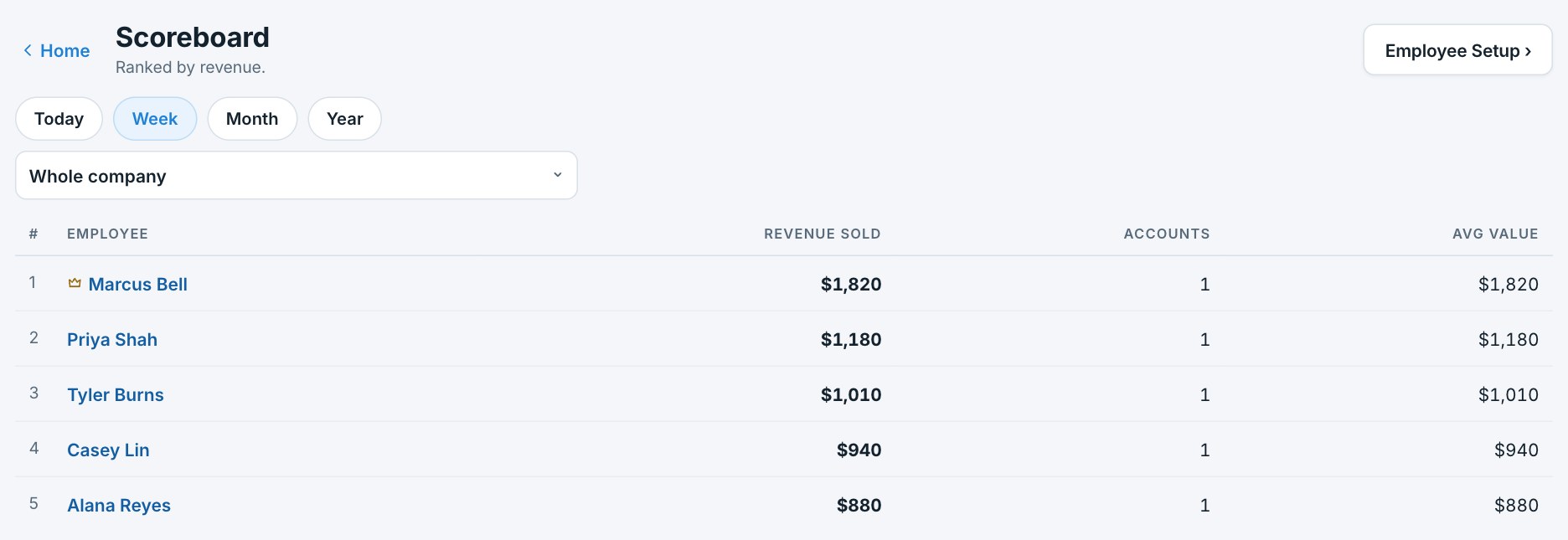
Today's production By person, team and office In every portal
The Scoreboard in Swarm, ranked by revenue this week: five reps with revenue sold, accounts, and average value.
Part four · People

Everyone on the team, set up to earn.

One record per person, a package to set them up, and a portal that answers their questions before they ask.

One card per person.

Pay setup, team and office, stats, files and a year-end statement, on one record. A pay setup board shows everyone at a glance, so a gap is never a surprise on payday.
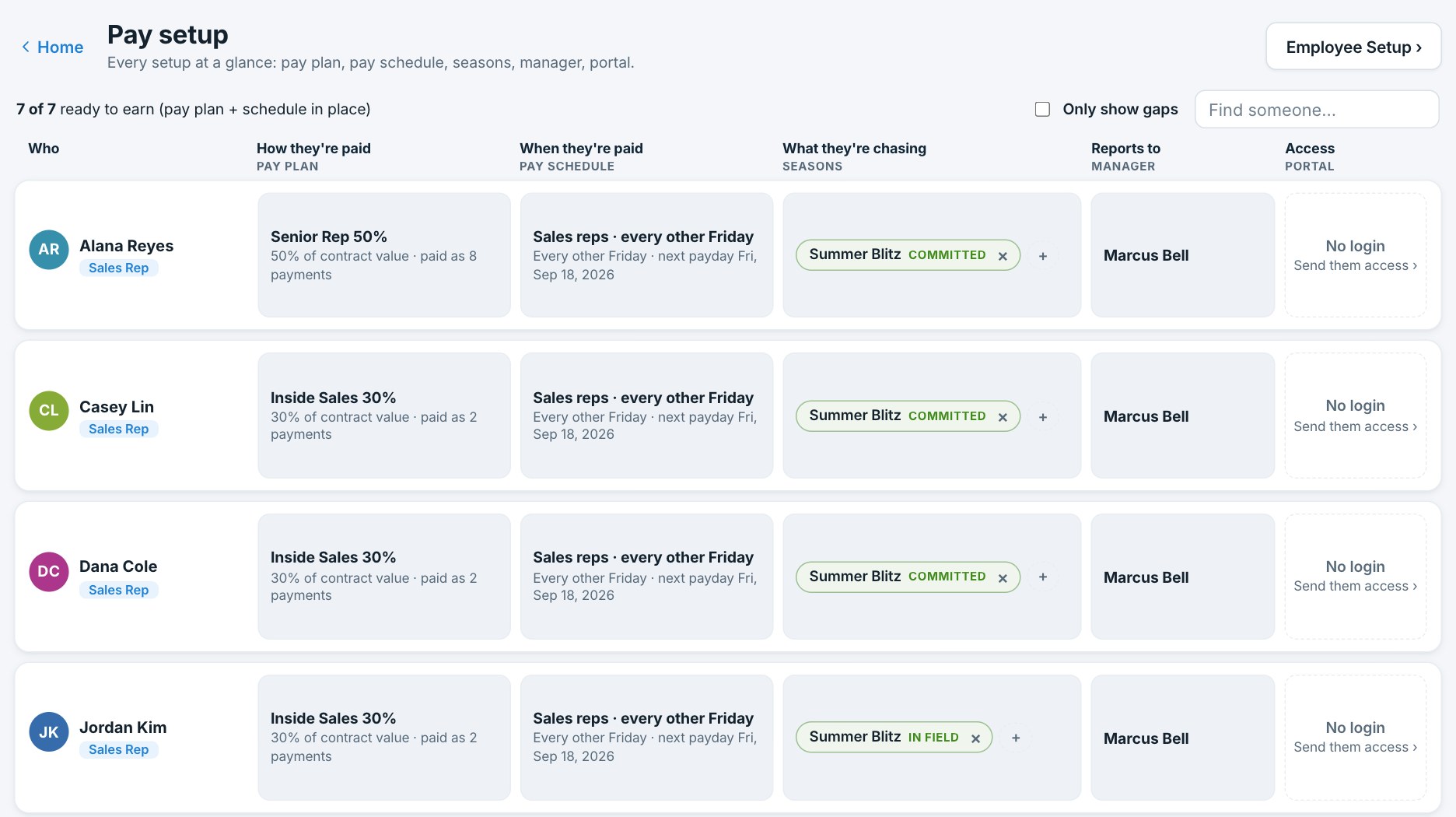
Pay setup at a glance Year-end statement Roles and permissions Files on the record
The pay setup board in Swarm: every employee with their pay plan, pay schedule, tiers and portal status side by side.

Their own portal, on their phone.

The next check and the day it lands, every past check explained line by line, a goal for the season. A question about a check goes to the office from the check itself.
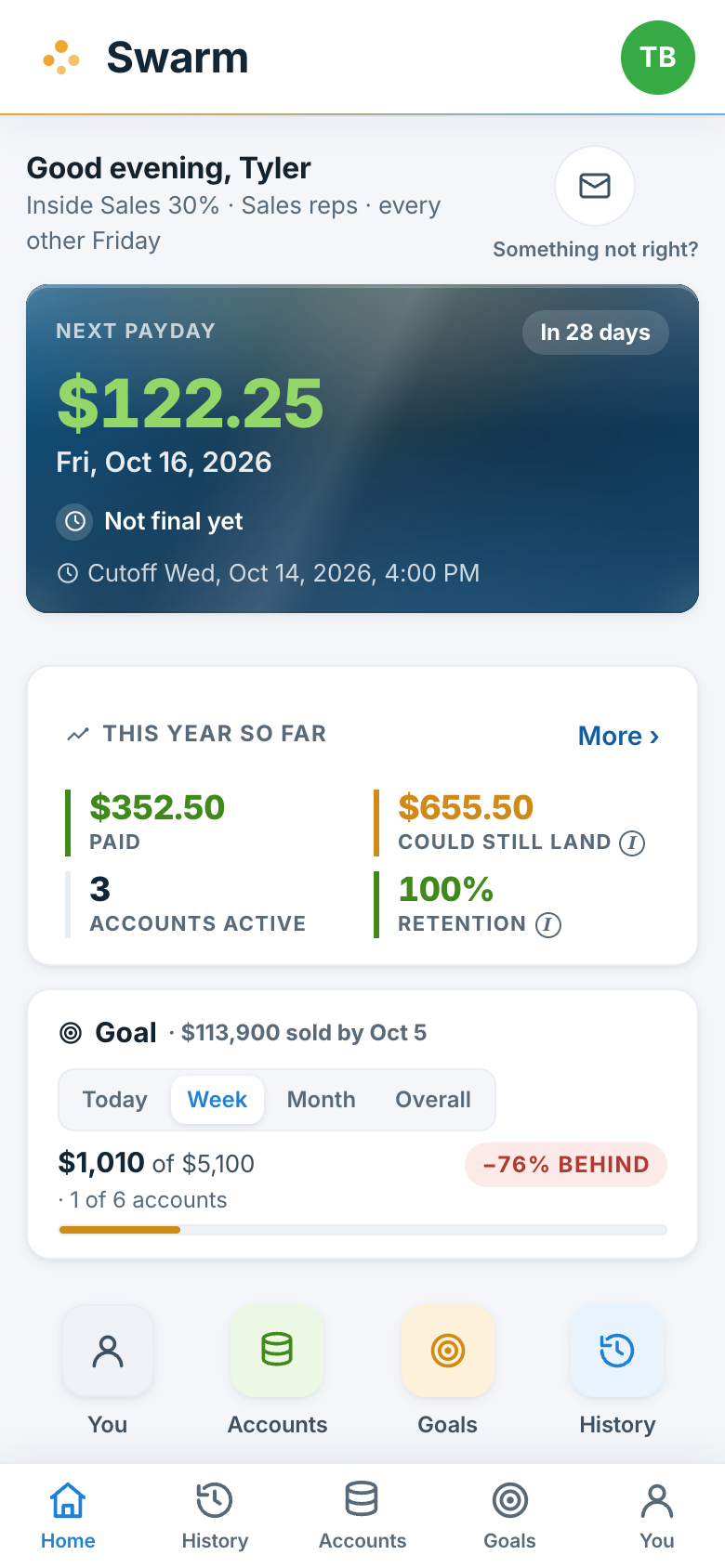
Next check Every past check, explained Goals and tier standing Ask from the check
A rep's portal on a phone: next payday $122.25 on Friday, October 16; this year so far; a goal for the season; the You, Accounts, Goals and History apps.
Part five · Planning

Plan the season with real numbers.

A forecast that plugs into your actual pay plans and teams, a plan that fills in from real sales, and a timeline that draws itself.

A forecast that plugs into your real pay plans.

Plug in the pay plan you actually use, the team and the season. Swarm shows what comes in, what goes out and where cash bottoms out, month by month. Change one thing and everything moves.
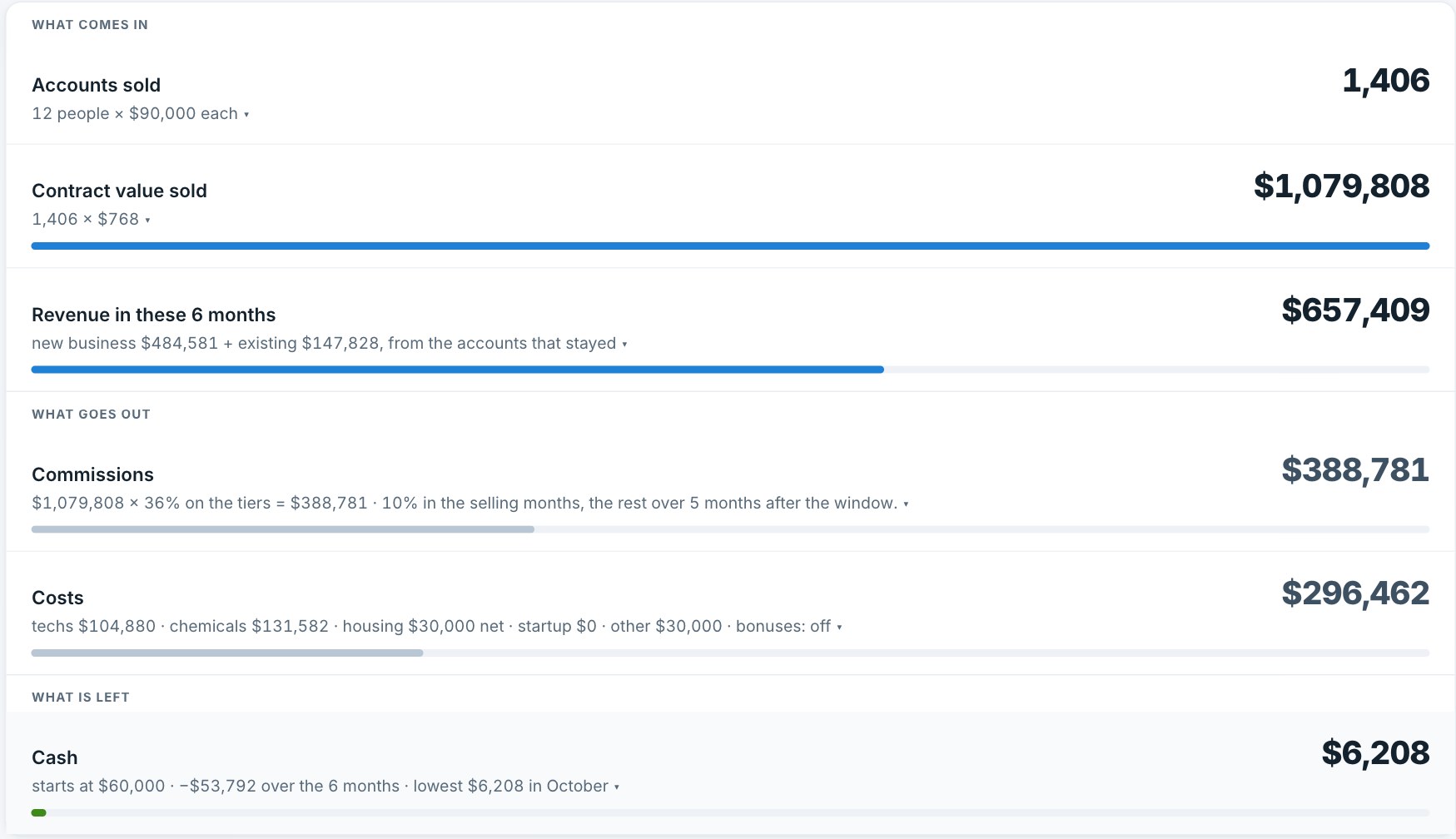
Real plans, packages and teams Cash, month by month Compare two forecasts
A forecast in Swarm: what comes in (accounts sold, contract value, revenue), what goes out (commissions, costs), and what is left (cash), each line with the math under it.

Make it the plan, and watch the goals fill in.

Turn a forecast into a plan with dated goals. They fill in from real sales as the season runs, and the timeline draws the whole year.
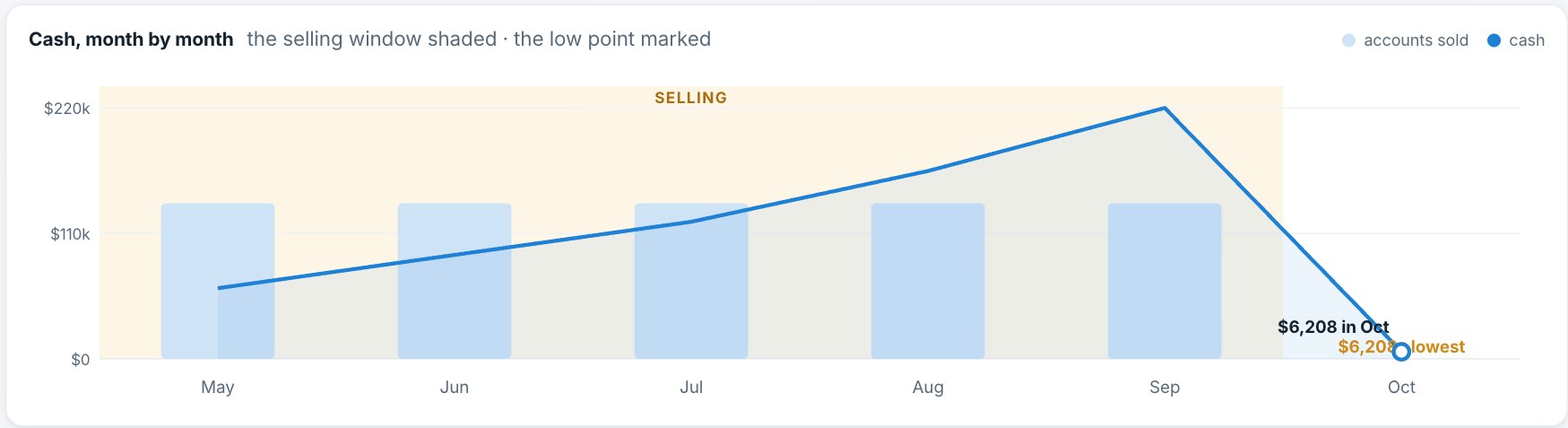
Goals that fill in from real sales Readiness before the season A timeline that draws itself
A forecast's cash, month by month: the selling window shaded and the low point marked.
Part six · Trust

It shows its work.

Everything sends on schedule and proves it, every change is on the record, and nothing is hidden from you.

The busywork does itself, and proves it.

Reports, reminders and alerts go out on their own schedule, and a health panel shows every send: when, and to whom. "Did it send?" is never a mystery.

Reports and reminders on schedule Every send on the record Editable templates
Automation health
Payout reports
Fri, Sep 18 · 6:00 AM · 14 people
Sent
Approval reminder
To payroll, three days before the cutoff
Sent
Sync alert
Only if a sync fails
Standing by

Payroll data, treated like payroll data.

Every change is logged with who, what and why, and anything that moves money needs a note. Each company's data is its own. Every check explains itself.

Full audit log Per-company isolation Every check explains itself
Audit trail
Adjustment +$150.00
"Missed upsell on account 4417" · Jun 30
Owner
Sale excluded
"Test row from the CRM" · Jun 28
Owner
Pay schedule changed
Unpaid checks moved to the new paydays · Jun 24
Automatic

Twenty minutes. Your pay plan. Live.

Bring the hardest commission scenario you have.